
The General section displays the statuses of all system components that affect SENET Boot performance.
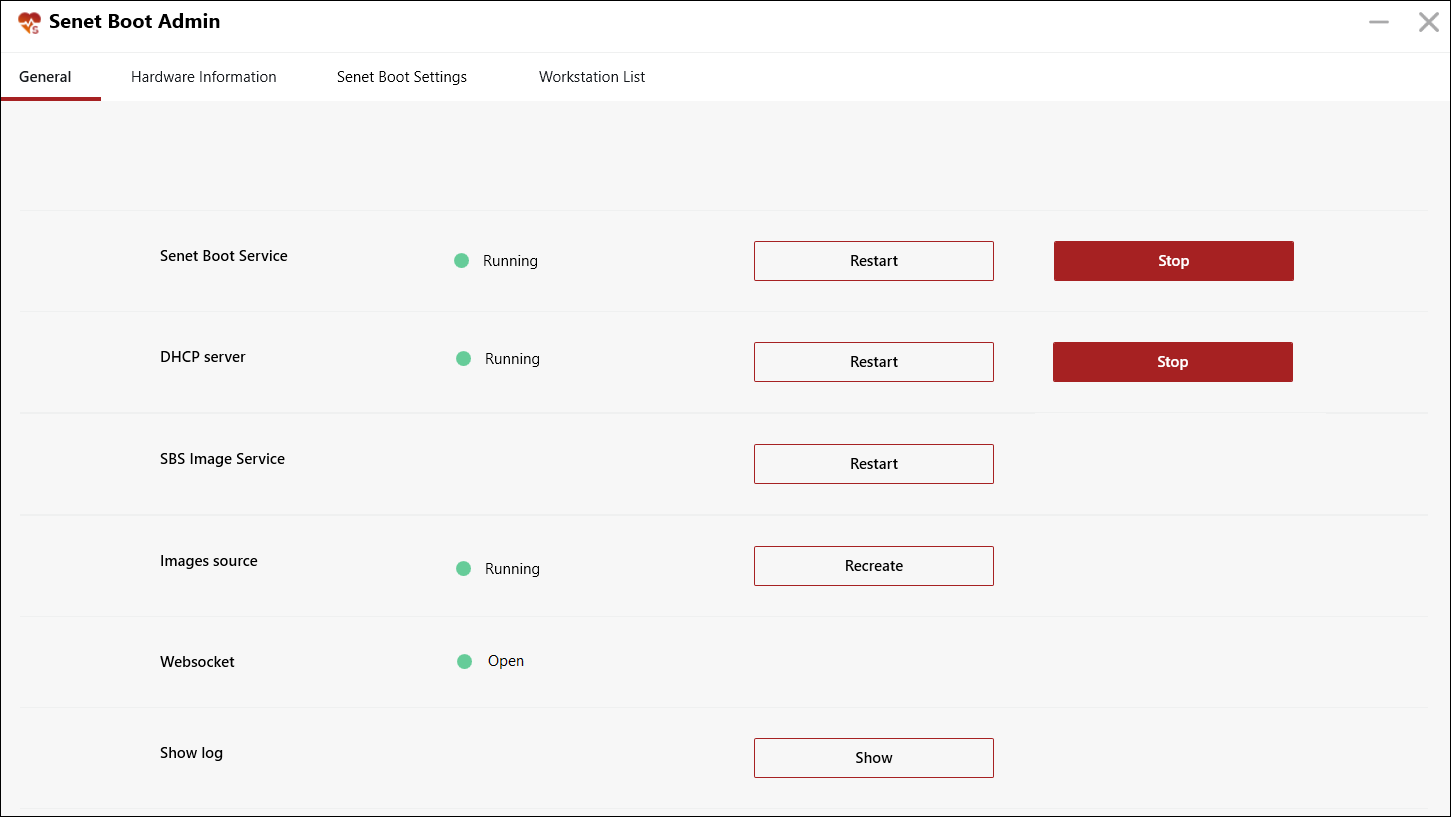
SENET Boot Service is a parameter, that is responsible for the operation of the service SENET Boot on the server PC. We highly do not recommend stopping or restarting the service while client sessions are running, as in this case the PCs will reboot and users will be logged out of the client shell.
SENET Boot service statuses:
- Running – indicates that the service is running.
- Stopped – indicates that the service is stopped.
- StopPending – a transitional status that appears when the service is disabled.
- StartPending – a transitional status that appears when the service is turned on.
– The Restart button allows you to restart the service.
– The Stop/Start button allows you to disable/start the SENET Boot service.
DHCP server is a parameter, that allows you to update the reading of network settings from the server without rebooting the client machines. That means, if you start some client PCs and then change the network settings in the DHCP section, then by rebooting this parameter, the new network settings will be applied at startup for new client PCs. At the same time, new settings will not be applied to previously turned-on workstations.
DHCP statuses:
- Running – indicates that the DHCP service is running.
- Stopped – indicates that the DHCP service is stopped.
- StopPending – a transitional status, that appears when the DHCP service is disabled.
- StartPending – a transitional status, that appears when the DHCP service is enabled.
- The Restart button allows you to restart the DHCP service.
- The Stop/Start button allows to disable/start DHCP service. If the DHCP service is disabled, client PCs will not be able to boot at startup, however, previously launched PCs will continue to work.
SBS Image Service is a parameter, that allows you to update the reading of image settings from the server without rebooting the client machines. That means, if you start some client PCs and then change the image settings in the Image section, then by rebooting this parameter, the new image settings will be applied at startup for new client PCs. In this case, the new settings will not be applied to previously turned-on PCs.
- The Restart button allows you to read updated information from the image settings. If you change the image parameters and restart this service while the club is running, then when new PCs are turned on, they will boot from the new image. At the same time, all previously launched PCs will continue to work on the image on which they were launched.
Images source is a special technology implemented as an operating system service (aka shadow copy), which allows you to copy images that are currently being worked on. This technology was not developed by us, and this parameter shows the operation of the shadow copy service itself.
Parameter statuses:
- Running – indicates that the service is running.
- Stopped – indicates that the service is stopped.
- The Recreate button allows you to recreate a shadow copy, that is, to make a copy of the image.
Websocket – a parameter, that indicates the presence or absence of connection with the SENET Server, and also shows the name of the server, to which the SENET Boot is connected.
Parameter statuses:
- Online – indicates that there is communication with the SENET Server.
- Offline – indicates that there is no connection with the SENET Server.
- Connecting – indicates that a connection to the SENET Server is in progress.
Show log – this parameter provides access to the SENET Boot logs directly from the application. Pressing the Show button will open the SENET Boot log file.
Comments
0 comments
Please sign in to leave a comment.